Showing posts with label USB. Show all posts

Thursday, 21 June 2012

Snowlinux 2 KDE "Ice" Officially Released,Downlod it now


--> Snowlinux 2 KDE "Ice" Officially Released on June 20th and is available for download now.Snowlinux 2 KDE code named as "Ice" is based on the Debian 6 (Squeeze) with Linux kernel 2.6.32 and KDE version 4.4.The new snowlinux os comes with the new Fushigi-Plasma-Theme.The new version is 100 % compatible with Ubuntu's Repository and is a Long term supported version which has support till february 2014


Features of  Snowlinux 2 KDE "Ice"
  • Based on Debian 6
  • Linux kernel 2.6.32
  • KDE 4.4 
  • 100 % compatible with Ubuntu's Repository
  • The new Fushigi-Plasma-Theme
  • Snowlinux KDM theme
  • Snowlinux KSplash theme
  • Snowlinux bootloader theme
  • Chromium
  • Icedove
  • Banshee
  • Shotwell 
  • OpenJDK 6 Java
  • Ubuntu font
  • Udated software and packages 
  • Better software selection
  • Better response and speed 
 Minimum requirements to install Snowlinux 2 KDE "Ice"
  • An x86-CPU
  • Minimum 512 MB memory
  • Minimum 4 GB free disk space
  • Graphics card capable of 800×600 resolution
  • CD-ROM drive or USB port

-->
 Snowlinux 2 KDE Edition comes as Live CDs for both 32-bit and 64-bit architectures.

Enhanced by Zemanta

Monday, 18 June 2012

Snowlinux KDE 2 RC Officially Available for Testing-Download Snowlinux 2RC


Snow linux 2RC released
--> Snowlinux "Ice" is based on debian 6 Squeeze.

what are the new features of snowlinux 2RC?
Highlights of Snowlinux 2 KDE RC Edition:
· Baseon on Debian 6
· Linux kernel 2.6.32
· Banshee
· Shotwell

· Chromium 18
· Icedove
· Firewall
· Apturl
· OpenJDK 6 Java
· Ubuntu font
· Fushigi-Plasma theme
· Better software selection
· Better response and speed
· Support for contrib, non-free, and debian-multimedia software repositories
· Added terminal colors
· Added delete permanently function

· Snowlinux KDM theme
· Snowlinux KSplash theme
· Snowlinux bootloader them

· Added Open in Terminal function;
· Added Open as Administrator function;
· Lots of system improvements.


Requirements of snowlinux 2RC

· x86 processor;
· minimum 512 MB memory;
· minimum 4 GB free disk space;
· minimum graphics card with  800x600 resolution;
· A CD-ROM drive or USB port.

Download snowlinux click here
Enhanced by Zemanta

Sunday, 29 April 2012

How to install the Ubuntu 12.04 LTS (Precise Pangolin) operating system


How to install the Ubuntu 12.04 LTS (Precise Pangolin) operating system

--> This tutorial will help you to install ubuntu 12.04 LTS (Precise Pangolin) on you system.

Requirements
1.Ubuntu 12.04 LTS desktop edition.You can download it here
2.Usb drive of DVD or cd

Install Ubuntu 12.04 LTS (Precise Pangolin)

First burn the downloaded ubuntu 12.04 LTS image on a cd or dvd or make a bootable usb drive using USB Creator.

Next step,Boot your computer from the created USB, DVD or CD
Within minutes you will see the Installation wizard.Select your language and click on the install ubuntu button to continue.

Preparing to install ubuntu 12.04 LTS
Make sure that you have the minimum space requirement for installation.If you tick for the option for downloading updates and third party softwares the installation process will take longer time to finish.
Allocate drive space
There are four options available for installing ubuntu 12.04 on your laptop or pc


1. Install Ubuntu 12.04 LTS alongside (other operating systems)
 Choose this option if you are going to use ubuntu 12.04 along with other operating   systems like windows 7,windows 8,os x etc.Remember that, after the installation, the Windows boot loader will be overwritten by the Ubuntu boot loader.
 
2. Upgrade Ubuntu x.x to 12.04 LTS
Choose this option if you are currently using ubuntu os.You can update to ubuntu 12.04 from your previous version of ubuntu.
 3. Erase and use the entire disk (Erase Ubuntu x.x and reinstall) 
Choose this option if you want to format the entire hard disk and install ubuntu 12.04.You can also install on your freshly bought laptop or desktop without any os.  

4. Something else (advanced)
This option allows you to manually manage your disk partitions and install ubuntu 12.04 on your laptop or desktop 
Click on the forward button to proceed.Then click on the install button to start installation.

 Where are you?
This option will help you to set your current location.You can select your area by pointing your location on a map of whole earth.Click on the forward button to proceed installation.
 

Keyboard layout
You can select your keyboard layout with this option.You can also use "detect keyboard layout" option to autodetect your keyboard layout.
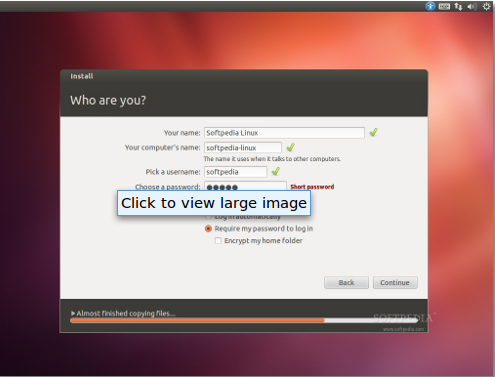
Who are you?
In this window you specify your details that have been asked for.You can set a password for your username and also you can encrypt the home folder.

At this point your ubuntu 12.04 will be installed
After a few minutes the installation will be completed and  a window appears asking for reboot.Click on the reboot now button.


 Now your computer will restart on ubuntu 12.04 (Precise Pangolin).Enjoy with the new features of ubuntu 12.04 LTS.
Enhanced by Zemanta

Sunday, 22 April 2012

Gnome 3.4.1 released officcially


Gnome 3.4.1 released officcially

--> Gnome developer team has released the latest stable version gnome 3.4.1 on april 18.
It includes bug fixes,translations updates and tiny improvements.The GNOME 3.4 desktop environment will receive another maintenance release, GNOME 3.4.2, in one month, on May 16th, 2012. This will be the last point release for GNOME 3.4, as the developers will start working on the next major version, GNOME 3.6.

Want to test gnome 3.4.1? Download gnome 3.4 Live images
To write the downloaded image to a USB drive do the following steps
  1. Insert your usb drive
  2. Run dmesg in a terminal: this will give you the location of the usb device in square brackets, such as sdb
  3. To write the downloaded  image, run sudo dd if=GNOME-3.4.iso of=/dev/DRIVE bs=8M conv=fsync, replacing DRIVE with the location of your usb device.
  4. Once the write operation has finished, you can reboot with the USB drive inserted.
Enhanced by Zemanta